

Control
Use Covalent Shaper during runtime by loading the identified model, shaping the desired joint command, and sending the shaped command to the robot manufacturer's SDK. The Python and C++ examples below use the same four control modes so the implementations can be reviewed side by side.
Before using this page, complete Calibration and Identification so that src/robot/models/current/shaper contains the identified Shaper model files.
Inputs
The Shaper needs:
- The controller sample time, in seconds.
- The identified model folder, usually
src/robot/models/current/shaper. - The robot URDF file.
- The number of shaped axes.
- The total number of robot joints.
- Desired joint position, velocity, and acceleration commands.
The application owns the machine-specific values used in these examples:
sample_time_s: the robot command period [s]. This must match the rate used by the robot SDK or realtime control loop.num_axes: the number of identified Shaper model axes. This is usually the number of flexible axes identified during calibration, not necessarily the number of robot joints.num_joints: the width of the robot joint command vector.desired_trajectory_rad: joint positions[samples, num_joints]in radians.desired_velocity_rad_sanddesired_acceleration_rad_s2: joint velocity and acceleration arrays with the same shape asdesired_trajectory_rad. Use planner-provided derivatives when available; numerical derivatives are acceptable for examples and diagnostics.vibration_shaping_weight: the shaping blend.0.0sends the unshaped command,1.0sends the fully shaped command, and intermediate values blend between them.
Most Shaper tuning parameters are optional. If you are unsure, start with the SDK defaults or the values shown in the examples, validate the behavior on representative trajectories, and tune only the parameters that solve a specific application problem.
The paired snippets use the constants and deterministic input arrays defined by the runnable examples. In both languages, the sample time is 0.004 s, positions are in radians, velocities are in rad/s, accelerations are in rad/s², the shaping weight is 1.0, and the fixed window is 0.20 s.
The repository examples are hardware-free: they make no robot SDK call and connect to no robot. Replace the output comments with the robot manufacturer's SDK only in a qualified application integration.
Example 1: Shape a Full Known Trajectory
Use this path when the full joint trajectory is known before the move starts. The Shaper receives the complete command and returns shaped position, velocity, and acceleration arrays. Use this example when your planner or robot SDK can provide the full command before execution and trajectories are short or repeatable.
Python SDK
pythonalways_on_shaper = ShaperInterface(
    sample_time=SAMPLE_TIME_S,
    model_directory=str(MODEL_DIRECTORY),
    urdf_filepath=str(URDF_FILEPATH),
    num_axes=NUM_AXES,
    num_joints=NUM_JOINTS,
    backend_kind=EXAMPLE_BACKEND_KIND,
)
always_on_shaped = always_on_shaper.process_trajectory(
    command=desired_trajectory_rad,
    command_dot=desired_velocity_rad_s,
    command_ddot=desired_acceleration_rad_s2,
    time_vector=list(time_s),
    vibration_shaping_weight=SHAPER_ENABLED_WEIGHT,
    residual_shaping_strategy=None,
    finalize_tail=False,
)
# Send always_on_shaped through the robot SDK in a qualified integration.
C++ SDK
cppNativeShaper always_on_shaper(
    MakeBackendConfiguration(options.assets_directory));
ProcessTrajectoryRequest always_on_request;
always_on_request.input.position_rad = desired.positions_rad;
always_on_request.input.velocity_rad_per_s = desired.velocities_rad_s;
always_on_request.input.acceleration_rad_per_s2 =
    desired.accelerations_rad_s2;
always_on_request.input.time_s = desired.time_s;
always_on_request.vibration_shaping_weight = kShaperEnabledWeight;
always_on_request.residual_shaping_strategy = std::nullopt;
always_on_request.finalize_tail = false;
Trajectory always_on = ToTrajectory(
    always_on_shaper.ProcessTrajectory(always_on_request));
// Send always_on through the robot SDK in a qualified integration.
Adjust these values for this mode:
sample_time_s,num_axes,num_joints,model_directory, andurdf_filepathdescribe the robot and the identified Shaper model.desired_trajectory_rad,desired_velocity_rad_s, anddesired_acceleration_rad_s2are the complete planned command that will be shaped before the move starts.vibration_shaping_weight=1.0applies full vibration shaping to the whole trajectory.residual_shaping_strategy=Nonedisables residual-tail switching; the full known trajectory is shaped as one command.finalize_tail=Falsekeeps the example output on the planned trajectory horizon. UseTrueonly when your controller can accept the appended delayed tail samples.
Example 2: Shape the Final Part of a Known Trajectory
Use this path when the full trajectory is known, but you want Shaper to focus on the residual vibration near the end of the move. This can reduce unnecessary command delay earlier in the move while reducing end-of-move vibration to an acceptable level. Shaping only the end of the trajectory is not guaranteed to achieve maximum vibration reduction. Use this example when the end of the motion is the main vibration-sensitive part of the move and cycle time is as important as vibration reduction.
Python SDK
pythonspeed_first_switch_limits = make_speed_first_switch_limits(
    max_velocity_rad_s=SWITCH_MAX_VELOCITY_RAD_S,
    max_acceleration_rad_s2=SWITCH_MAX_ACCELERATION_RAD_S2,
    max_search_s=SWITCH_MAX_SEARCH_S,
    max_qp_attempts=SWITCH_MAX_QP_ATTEMPTS,
    window_target_margin_s=SWITCH_WINDOW_TARGET_MARGIN_S,
)
residual_offline_shaper = ShaperInterface(
    sample_time=SAMPLE_TIME_S,
    model_directory=str(MODEL_DIRECTORY),
    urdf_filepath=str(URDF_FILEPATH),
    num_axes=NUM_AXES,
    num_joints=NUM_JOINTS,
    backend_kind=EXAMPLE_BACKEND_KIND,
)
residual_offline_shaped = residual_offline_shaper.process_trajectory(
    command=desired_trajectory_rad,
    command_dot=desired_velocity_rad_s,
    command_ddot=desired_acceleration_rad_s2,
    time_vector=list(time_s),
    vibration_shaping_weight=SHAPER_ENABLED_WEIGHT,
    residual_shaping_strategy=ResidualShapingStrategy.ALIGNED_TAIL,
    residual_switch_limits=speed_first_switch_limits,
    finalize_tail=False,
)
# Send residual_offline_shaped through the robot SDK in a qualified integration.
C++ SDK
cppconst ResidualSwitchLimits speed_first_switch_limits =
    MakeSpeedFirstSwitchLimits();
NativeShaper residual_offline_shaper(
    MakeBackendConfiguration(options.assets_directory));
ProcessTrajectoryRequest residual_request;
residual_request.input.position_rad = desired.positions_rad;
residual_request.input.velocity_rad_per_s = desired.velocities_rad_s;
residual_request.input.acceleration_rad_per_s2 =
    desired.accelerations_rad_s2;
residual_request.input.time_s = desired.time_s;
residual_request.vibration_shaping_weight = kShaperEnabledWeight;
residual_request.residual_shaping_strategy =
    ResidualShapingStrategy::kAlignedTail;
residual_request.residual_switch_limits = speed_first_switch_limits;
residual_request.residual_transition_margin_s = kResidualTransitionMarginS;
residual_request.finalize_tail = false;
Trajectory residual_tail = ToTrajectory(
    residual_offline_shaper.ProcessTrajectory(residual_request));
// Send residual_tail through the robot SDK in a qualified integration.
Adjust these values for this mode:
machine_velocity_limits_rad_s,machine_acceleration_limits_rad_s2, andmachine_jerk_limits_rad_s3are the physical joint limits used by the constrained switch optimizer. They should come from robot qualification, not from a universal Shaper default.max_search_sis how far before the residual-sensitive tail Shaper is allowed to search for a switch point. Larger values give the optimizer more options but can make shaping start earlier and increase compute time.max_qp_attemptsbounds the candidate-search compute budget.tracking_weight,acceleration_weight, andjerk_weighttune the optimization objective. They are not hard physical limits; the hard limits aremax_velocity,max_acceleration, andmax_jerk.residual_shaping_strategy=ResidualShapingStrategy.ALIGNED_TAILtells Shaper to send the original command first, then switch into a shaped tail near the end of the move.residual_switch_limits=residual_switch_limitspasses the machine velocity, acceleration, and optional jerk limits into the switching trajectory optimizer.finalize_tail=Falsekeeps the example output on the planned trajectory horizon. UseTrueonly when your controller can accept the appended delayed tail samples.
If you are unsure about the constrained-switch tuning, start by omitting residual_switch_limits and using the default aligned-tail behavior. Add ResidualSwitchLimits only after you have qualified the machine limits and need the switch trajectory to obey them.
Example 3: Shape a Known Trajectory in Fixed Windows
Use this path when the full trajectory is known before execution, but you want Shaper to shape and emit command windows while the robot is already moving. This way, you do not need to wait until the whole trajectory is shaped. This example is ideal for applications where the trajectory is known beforehand but is very long.
Python SDK
pythonwindowed_shaper = ShaperInterface(
    sample_time=SAMPLE_TIME_S,
    model_directory=str(MODEL_DIRECTORY),
    urdf_filepath=str(URDF_FILEPATH),
    num_axes=NUM_AXES,
    num_joints=NUM_JOINTS,
    backend_kind=EXAMPLE_BACKEND_KIND,
)
windowed_buffer = windowed_shaper.create_windowed_buffer(
    command=desired_trajectory_rad,
    command_dot=desired_velocity_rad_s,
    command_ddot=desired_acceleration_rad_s2,
    time_vector=list(time_s),
    vibration_shaping_weight=SHAPER_ENABLED_WEIGHT,
    residual_shaping_strategy=None,
    window_s=WINDOW_DURATION_S,
    auto_qualify_window=False,
    finalize_tail=False,
)
windowed_buffer.fill_available()
shaped_windows = []
while windowed_buffer.has_next():
    shaped_window = windowed_buffer.pop_window()
    if shaped_window is not None:
        shaped_windows.append(shaped_window)
        continue
    windowed_buffer.fill_available(max_windows=1)
# Send each popped window through the robot SDK in timestamp order.
C++ SDK
cppNativeShaper windowed_shaper(
    MakeBackendConfiguration(options.assets_directory));
ShaperWindowRequest window_request;
window_request.command_rad = desired.positions_rad;
window_request.command_velocity_rad_s = desired.velocities_rad_s;
window_request.command_acceleration_rad_s2 = desired.accelerations_rad_s2;
window_request.time_s = desired.time_s;
window_request.vibration_shaping_weight = kShaperEnabledWeight;
window_request.residual_shaping_strategy = std::nullopt;
window_request.window_s = kWindowDurationS;
window_request.prefill_windows = 1;
window_request.finalize_tail = false;
auto windowed_buffer = windowed_shaper.CreateWindowedBuffer(window_request);
static_cast<void>(windowed_buffer->FillAvailable());
std::vector<ShapedWindow> shaped_windows;
while (windowed_buffer->HasNext()) {
    auto shaped_window = windowed_buffer->PopWindow();
    if (!shaped_window.has_value()) {
        static_cast<void>(windowed_buffer->FillAvailable(1));
        continue;
    }
    ShapedTrajectory shaped_trajectory{
        std::move(shaped_window->positions),
        std::move(shaped_window->velocities),
        std::move(shaped_window->accelerations),
        std::move(shaped_window->time_s),
    };
    shaped_windows.push_back(ShapedWindow{
        ToTrajectory(std::move(shaped_trajectory)),
        shaped_window->start_index,
        shaped_window->stop_index,
        shaped_window->is_tail,
    });
}
windowed_buffer->Close();
// Send each popped window through the robot SDK in timestamp order.
Adjust these values for this mode:
window_sis the duration [s] of each shaped command window. Smaller windows reduce startup buffering but give Shaper less look-ahead and increase per-window overhead.auto_qualify_window=Falsemeans the example uses the exactwindow_svalue. Set it toTruewhen you want Shaper to choose a qualified window duration from candidate windows.residual_shaping_strategy=Nonedisables residual-tail switching in this example so the fixed-window result matches the full-known-trajectory shaping behavior. To run residual-tail switching in windows, passResidualShapingStrategy.ALIGNED_TAILand the same kind ofResidualSwitchLimitsshown in Example 2.fill_available()computes shaped windows that are ready to send.pop_window()returns the next shaped window in command order.finalize_tail=Falsekeeps the example output on the planned trajectory horizon. UseTrueonly when your controller can accept the appended delayed tail window.
Example 4: Shape a Sample-by-Sample Stream
Use this path when the full trajectory is not known ahead of time. The online planner generates one command sample, Shaper modifies that sample, and the shaped command is sent to the robot SDK before the next control cycle. Use this example when commands are generated online. The Shaper does not receive the complete future trajectory in this mode; it only receives the current command sample.
Python SDK
pythonstreaming_shaper = ShaperInterface(
    sample_time=SAMPLE_TIME_S,
    model_directory=str(MODEL_DIRECTORY),
    urdf_filepath=str(URDF_FILEPATH),
    num_axes=NUM_AXES,
    num_joints=NUM_JOINTS,
    backend_kind=EXAMPLE_BACKEND_KIND,
    shared_impulse_policy="per_axis",
    shared_impulse_shapes_all_joints=False,
)

for sample_time_s in time_s:
    command_rad, velocity_rad_s, acceleration_rad_s2 = (
        generate_point_to_point_sample(
            start_position_rad=start_position_rad,
            goal_position_rad=goal_position_rad,
            current_time_s=float(sample_time_s),
            move_duration_s=MOVE_DURATION_S,
        )
    )
    shaped_sample = streaming_shaper.process_sample(
        command=command_rad,
        command_dot=velocity_rad_s,
        command_ddot=acceleration_rad_s2,
        vibration_shaping_weight=SHAPER_ENABLED_WEIGHT,
    )
    # Send shaped_sample through the robot SDK in a qualified integration.
C++ SDK
cppNativeShaper streaming_shaper(MakeBackendConfiguration(
    options.assets_directory,
    SharedImpulsePolicy::kPerAxis,
    false));
Trajectory streamed;
const Eigen::Index stream_samples = desired.time_s.size();
streamed.time_s = desired.time_s;
streamed.positions_rad.resize(stream_samples, kNumJoints);
streamed.velocities_rad_s.resize(stream_samples, kNumJoints);
streamed.accelerations_rad_s2.resize(stream_samples, kNumJoints);
for (Eigen::Index sample = 0; sample < stream_samples; ++sample) {
    const Trajectory command = GeneratePointToPointSample(
        start_position_rad,
        goal_position_rad,
        streamed.time_s(sample),
        kMoveDurationS);
    ProcessSampleRequest request;
    request.position_rad = command.positions_rad.row(0).transpose();
    request.velocity_rad_per_s = command.velocities_rad_s.row(0).transpose();
    request.acceleration_rad_per_s2 =
        command.accelerations_rad_s2.row(0).transpose();
    request.vibration_shaping_weight = kShaperEnabledWeight;
    auto shaped_sample = streaming_shaper.ProcessSample(request);
    streamed.positions_rad.row(sample) = shaped_sample.position_rad.transpose();
    streamed.velocities_rad_s.row(sample) =
        shaped_sample.velocity_rad_s.transpose();
    streamed.accelerations_rad_s2.row(sample) =
        shaped_sample.acceleration_rad_s2.transpose();
    // Send shaped_sample through the robot SDK in a qualified integration.
}
Adjust these values for this mode:
- The online planner should return the current joint position, velocity, and acceleration command vectors
[num_joints]. vibration_shaping_weightis the target online shaping blend for the current stream. Use1.0for full shaping, or ramp it between0.0and1.0when enabling or disabling shaping online.vibration_weight_transition_s=Nonelets Shaper choose the smootherstep transition duration from the requested weight change. Set a fixed duration [s] when your controller needs a specific enable/disable ramp time.shared_impulse_policy="per_axis"shapes each identified axis independently. This matches the runnable example and avoids forcing one axis's shaping delay onto every other axis.shared_impulse_shapes_all_joints=Falsekeeps this streaming example focused on the identified shaped axes instead of applying a shared impulse policy to every joint command.
Runnable Repository Example
The paired snippets above show the controller boundaries. The full hardware-free examples include deterministic trajectory generation, validation, diagnostics, and plotting.
Run the Python example from the reforge-core repository root:
bashsource .venv/bin/activate
python src/robot/example_usage/shaper/python/shaper_example_usage.py
Build and run the C++ installed-package consumer from its directory. Install the current reforge-core wheel and Matplotlib in an activated environment, as documented in the C++ example README.
bashcd src/robot/example_usage/shaper/cpp
REFORGE_SHAPER_PREFIX="$(python -c \
  'from reforge_core import cmake_prefix; print(cmake_prefix())')"
cmake -S . -B build \
  -DCMAKE_BUILD_TYPE=Release \
  -DReforgeShaper_ROOT="$REFORGE_SHAPER_PREFIX"
cmake --build build --parallel
./build/shaper_example_usage --headless --output-dir ./build/figures
Omit --headless to open the two interactive figure windows. Headless mode suppresses GUI windows and saves exactly three images: the two runtime figures and the derived documentation residual close-up. Both modes print deterministic effectiveness metrics. Supplying --output-dir also writes metrics.json, five trajectory CSV files, and the plot adapter artifacts used for inspection.
The C++ build stages src/robot/example_usage/shaper/cpp/assets/test_robot.urdf and the compact synthetic two-axis native fixture from cpp/assets/ beside the executable. The native loader reads shaper_models.native.json; the .pt filenames in the manifest are cross-format metadata and no PyTorch model or runtime is required.
Expected Output
Running either controller implementation prints residual-vibration summaries. Interactive mode opens Figures 1 and 2. Figure 3 is a deterministic, headless documentation asset derived from the response plot rather than a third runtime window.
Figure 1 — Robot commands
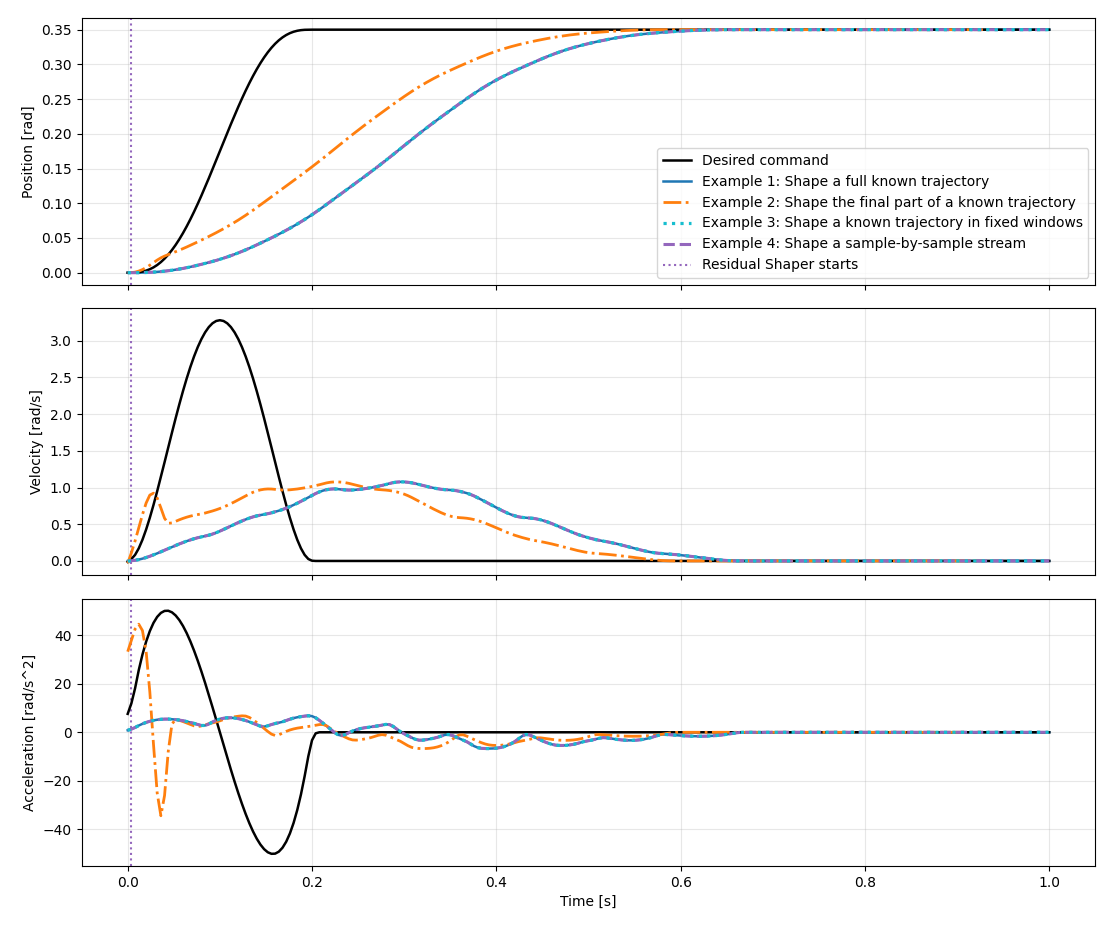
This figure shows the joint commands sent to the robot. It is laid out as three rows for one shaped joint axis — position [rad], velocity [rad/s], and acceleration [rad/s²]. Five commands are overlaid on every subplot:
- Desired command (black, solid): the raw reference trajectory you want the robot to follow.
- Example 1 command (blue, solid): the command Shaper computes when shaping the full known trajectory before execution.
- Example 2 command (orange, dash-dot): the command Shaper computes when shaping only the residual-sensitive final part of the known trajectory.
- Example 3 command (cyan, dotted): the command Shaper emits from the fixed-window trajectory buffer.
- Example 4 command (purple, dashed): the command Shaper emits sample by sample as an online planner streams samples in.
The key takeaway is that the shaped commands deliberately differ from the desired command — Shaper pre-shapes the position, velocity, and acceleration profiles to suppress residual vibration. Example 1, Example 3, and Example 4 overlap almost exactly, confirming that the fixed-window and sample-by-sample paths, both online shaping (trajectory shaped as robot is moving), reproduce the same result as the offline shaping behavior for this trajectory.
Figure 2 — Robot response
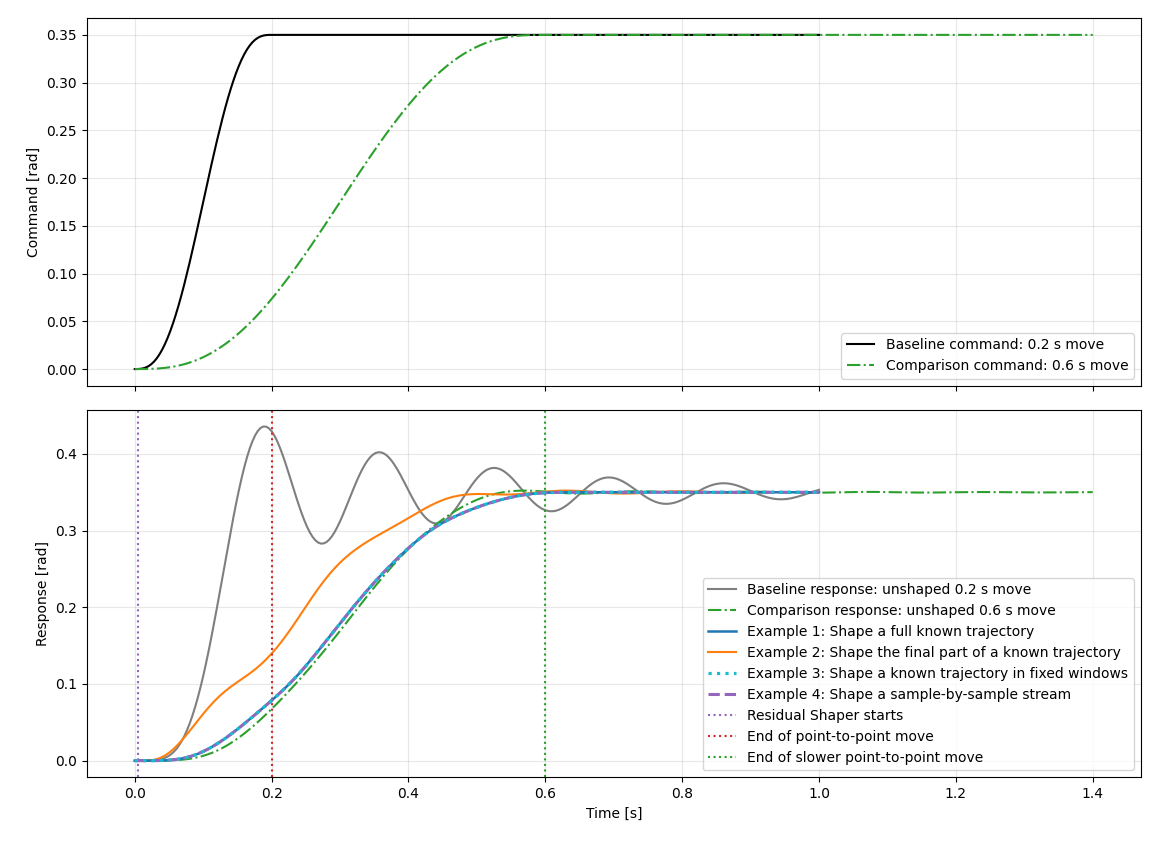
This figure shows the resulting robot motion — the simulated machine response to each command — with command profiles in the first row and response profiles in the second row. It includes two unshaped reference commands:
- Baseline command (black, solid) and baseline response (gray): the fast 0.2 s unshaped move and the vibration it leaves after the move ends.
- Comparison command and comparison response (green, dash-dot): a slower 0.6 s unshaped move. This reference shows what happens if the move is slowed down instead of shaped.
- Response to Shaper Example 1 command (blue), Example 2 command (orange), Example 3 command (cyan, dotted), and Example 4 command (purple, dashed): how the joint moves when driven by each Shaper command.
- The purple dotted vertical line marks when the residual-tail Shaper starts changing the command.
- The red dotted vertical line marks the end of the commanded motion; the residual vibration is what happens to the right of it, during the final dwell.
In this runnable example, the residual-tail Shaper starts changing the command near the beginning of the move. That timing is specific to this trajectory and switch-limit configuration. For other trajectories, the residual-tail Shaper can start much later. Before that switch point, the command sent to the robot is the original desired trajectory with no shaping applied.
Figure 3 — Residual vibration close-up
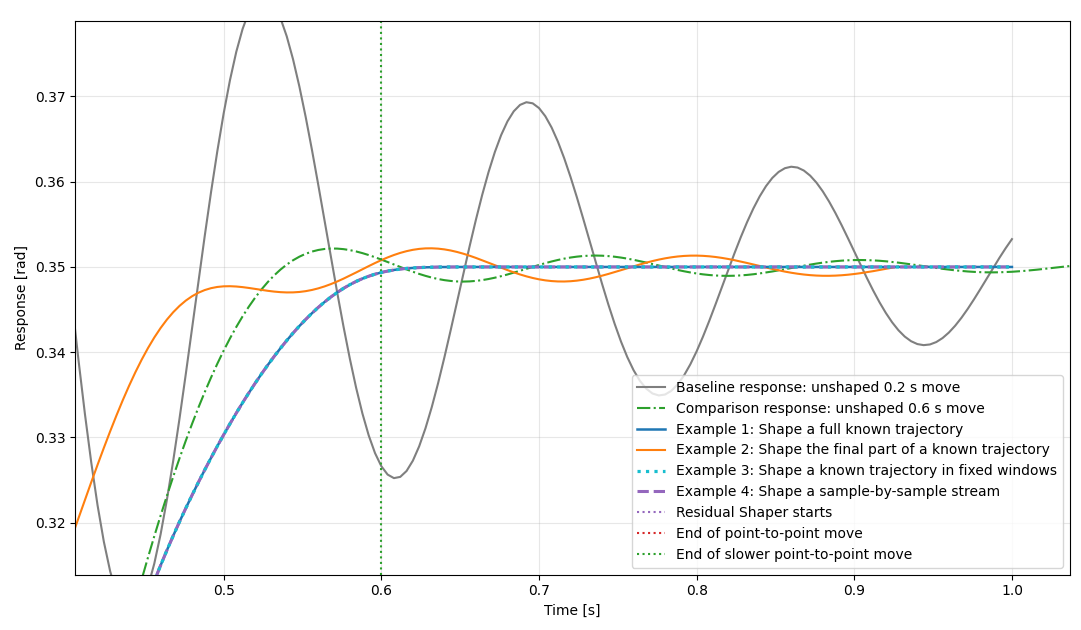
This figure zooms into the end-of-motion response so the residual vibration is easier to compare:
- The green comparison response still oscillates around the target even though the command was slowed from 0.2 s to 0.6 s.
- The blue, cyan, and purple shaped responses settle with effectively zero residual vibration for this example.
- The orange residual-tail response reduces the residual vibration while avoiding the need to slow the entire reference trajectory.
The comparison is important because Shaper can add delay to the command, but simply slowing the desired trajectory to a similar total time does not necessarily produce the same residual-vibration performance. If the small residual vibration in the slower green response is acceptable for an application, the residual-tail Shaper can finish the command faster than slowing the full move. That is true even in this example, where the residual-tail transition starts near the beginning; when the transition starts later in the trajectory, the residual-tail approach has an even larger timing advantage because it sends the unshaped desired command until the switch point.
Together the figures tell the whole story: Shaper changes the command (Figure 1) so that the robot's actual response (Figure 2) reaches the target with far less residual vibration than commanding the desired trajectory directly.